 English
 Français
 Español
 Deutsch
 Italiano
 русский
 简体中文
简体中文 ελληνικά
 العربية

 How to uninstall CardRecoveryPro
You can uninstall CardRecovery from your computer via either of the following two methods:
Method 1:
Click the Windows "Start" Menu and go through the following options: "All Programs→CardRecoveryPro→Uninstall CardRecoveryPro".
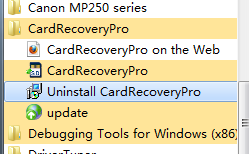
Click the button [Yes] in the pop-up interface.
Click the button [OK] to finish the uninstall.
Method 2:
Click the Windows "Start" menu
Select "Settings|Control Panel"
Open "Control Panel Home".
Double click "Programs"/
Select ‘Uninstall a program"
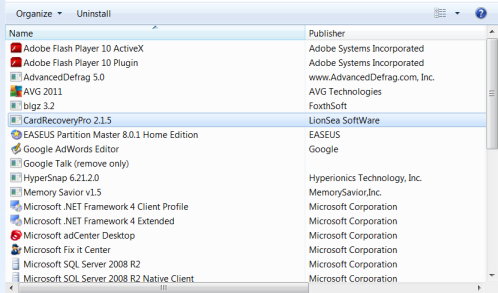
Find and select "CardRecoveryPro" in the list of installed programs
Click "Remove".
Select "Settings|Control Panel"
Open "Control Panel Home".
Double click "Programs"/
Select ‘Uninstall a program"
Find and select "CardRecoveryPro" in the list of installed programs
Click "Remove".